Wagtail Logo
v2.4
  • Getting started
  • Usage guide
  • Advanced topics
  • Reference
  • Support
  • Using Wagtail: an Editor’s guide
    • Introduction
    • Getting started
    • Finding your way around
      • The Dashboard
      • The Explorer menu
      • Using search
      • The Explorer page
    • Creating new pages
    • Editing existing pages
    • Managing documents and images
    • Managing Redirects
    • Administrator tasks
    • Browser issues
  • Contributing to Wagtail
  • Release notes
Wagtail
  • Docs »
  • Using Wagtail: an Editor’s guide »
  • Finding your way around »
  • Using search
  • Edit on GitHub

Using search

../../_images/screen04_search_screen.png
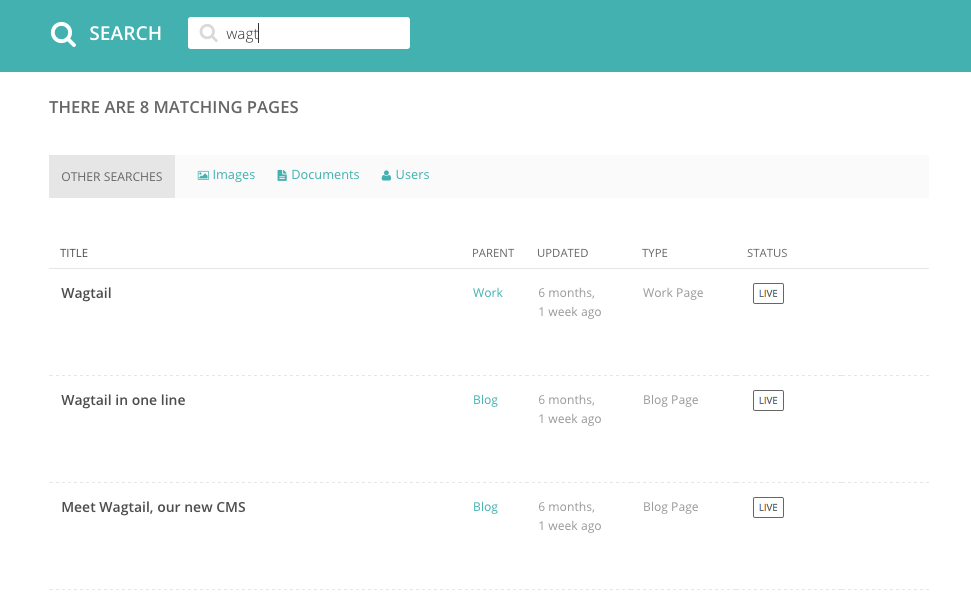
  • A very easy way to find the page that you want is to use the main search feature, accessible from the left-hand menu.
  • Simply type in part or all of the name of the page you are looking for, and the results below will automatically update as you type.
  • Clicking the page title in the results will take you to the Edit page for that result. You can differentiate between similar named pages using the Parent column, which tells you what the parent page of that page is.
Next Previous

© Copyright 2020, Torchbox Revision 442ab734.

Built with Sphinx using a theme provided by Read the Docs.